
Category: Sports
Developer: Fishbrain
 Verified App


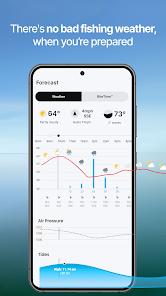
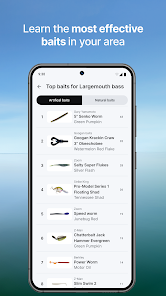
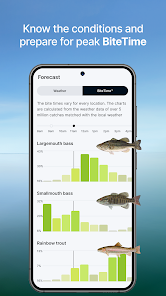
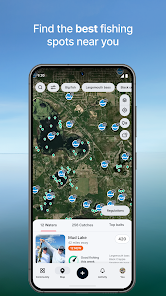
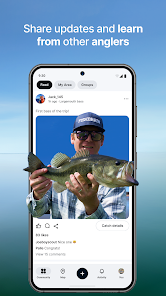
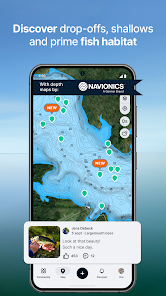
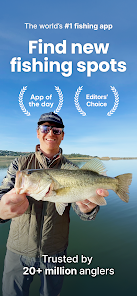
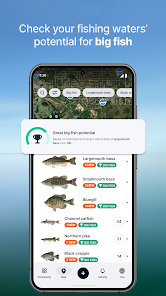
Fishbrain is a mobile app and social network for anglers. It is designed to help anglers find and share fishing spots, catch more fish, and connect with other anglers. The app includes a variety of features such as a fishing log, fishing forecasts, and a leaderboard. It also allows users to share photos and stories of their catches, and to follow other anglers.
Features & Highlights
Real Experience Using Fishbrain - Fishing App
Application Scenarios
As an avid angler, I often find myself juggling various fishing trips throughout the year. Fishbrain has become an essential part of my fishing toolkit. Whether I'm at a serene lake or a bustling river, I use the app to log my catches, find ideal fishing spots, and even connect with other local fishermen to share tips. Just last month, I organized a group fishing trip with friends using the app’s social features, which allowed us to coordinate our plans seamlessly. The community aspect of Fishbrain also lets me ask questions about specific locations, making each trip more fruitful.
User Experience
Navigating Fishbrain is a breeze. The user interface is clean and intuitive, making it easy to access features without getting lost in menus. When I first downloaded the app, I appreciated how quickly I could set up my profile and start logging catches. The workflow is straightforward—logging a catch takes only a few taps, and I can easily access my fishing history. Performance-wise, the app runs smoothly without lag, even when I'm out in remote areas. Overall, I feel empowered when using Fishbrain. It enhances my fishing experience and makes each trip more enjoyable through its user-friendly design and helpful features.
Pricing
Fishbrain offers a free basic version, which is perfect for casual anglers. However, I opted for the premium subscription for $9.99 a month, which unlocks advanced features like detailed fishing forecasts, unlimited catch logging, and enhanced maps with exclusive fishing spots. For serious anglers looking to enhance their fishing experience, the premium subscription is a worthwhile investment.
Updates & Support
The Fishbrain team is diligent about keeping the app up to date with new features and improvements. I’ve noticed several updates since I started using it, including enhancements to the fishing spot maps and added species identification tools. Support is also readily available; I once had a query about syncing my catches across devices, and the customer service team responded within a few hours, providing me with clear instructions. Their commitment to user experience shines through in their responsive support.
Security & Privacy Review
As an American user, I prioritize security and privacy when using any app, and Fishbrain does not disappoint. The app is available on both the App Store and Google Play, which adds an extra layer of trust knowing it's been vetted by these platforms. Upon registration, Fishbrain requires minimal personal information, such as an email address, which is standard for most apps. I appreciate that they allow users to opt-out of data tracking, ensuring my fishing habits remain private. Furthermore, I have not encountered intrusive ads or aggressive tracking behavior, making my overall experience pleasant and secure. I feel comfortable using Fishbrain, knowing that my personal data is handled responsibly.

 Connect with a vibrant fishing community Access detailed maps and fishing spots Track your catches and personal records Receive weather updates and fishing forecasts Share experiences and tips with fellow anglers
 Limited features in the free version Inaccurate location data sometimes reported Heavy reliance on user-generated content Subscription costs can be high for premium features
fish fish fish
Decent app to log your worthy or notable catches.
new update is awesome

it's pretty good for a free app but a paid subscription should cost less $$$.
Served me well for almost a decade. Just wish they would let you send pics through DM.
Review Source: Google Play store public user reviews.
Yes, Fishbrain collects personal data to provide its services, improve user experience, and personalize content. Users should review the privacy policy for detailed information on data collection and usage.
Fishbrain offers a free version with limited features, and users can explore premium features through a subscription. A free trial may also be available for new users to test premium features.
Yes, Fishbrain typically requires an internet connection to access its features, such as maps, social interactions, and updates. However, some features may be available offline once they are downloaded.
You can contact Fishbrain support through the app's help center, email support directly, or use social media channels for feedback and assistance.
You can manage or cancel your subscription through the app store where you purchased the subscription (iOS or Android) by accessing your account settings and subscription options.
You can reach Fishbrain customer service through the app's support section or by emailing support
To activate your subscription, log in to the app, navigate to the subscription section, and follow the prompts to complete the payment process.
Your customer number can usually be found in your account settings within the app or on your subscription confirmation email.
If you can't log in, check your internet connection, reset your password, or contact customer support for assistance.
Greetings from just under the surface.We’re always fine-tuning and tweaking Fishbrain to make it easier and better for you to use. This time around you’ll be happy to hear that we’ve fixed a bunch of bugs. Then fed them to the fish. And don’t forget, if you have any suggestions or need support, we’re here for you at: [email protected] lines!

SEGA FOOTBALL CLUB CHAMPIONS

Mini Golf Club-PvP Multiplayer

MLB

CBS Sports App: Scores & News

sportsYou

TeamReach - Your Team App

Zepp

Ragdoll Basketball 3D

SportsEngine – Team Management

Willow - Watch Live Cricket

UDisc Disc Golf App
TCG Card Scanner TCG Collector
 Google Play
  App Store